Barcode Quality Grading: ISO 15416 / 15415 in Software
A barcode that scans is not a barcode that passes. Skewed, faded or smudged code...
 HappyLab shared on Aug 28, 2026HappyLabshared on Aug 12, 2026
A barcode scanner has spent decades doing one thing perfectly: beep, and the value is in your system.
Ask it to read the characters engraved on a part, printed on a label or stamped into plastic, and it has nothing to offer. A scanner is a reader, not a reader of text. It decodes a defined symbology — it cannot interpret an arbitrary character image. Whenever a customer needs a new character set, a new layout or an extra inspection point, the traditional approach runs out of road.
Scanner-OCR V2 adds that missing brain to the scanner you already own. Your scanner stays the reliable eye; Scanner-OCR is the brain that reads what it sees. Pull the trigger and the recognised text goes straight into the active field — the same gesture your team already uses for barcodes.
Everything runs on the local PC. No network, no cloud, no image ever leaves your factory.
TIP
New global site. The product interface is currently in Chinese while we finish the English build — it ships in October 2026. In the meantime, tell us what you need and we’ll set up a fast, tailored version for you: sales@happylab.me.
Two approaches dominate today, and both hit a wall on the factory floor.
OCR built into the scanner’s own hardware is easy to deploy but frozen at the moment of manufacture. The vision model is fixed; it cannot follow your changing requirements (new characters, new layouts, more inspection points), and it cannot adapt to different industries.
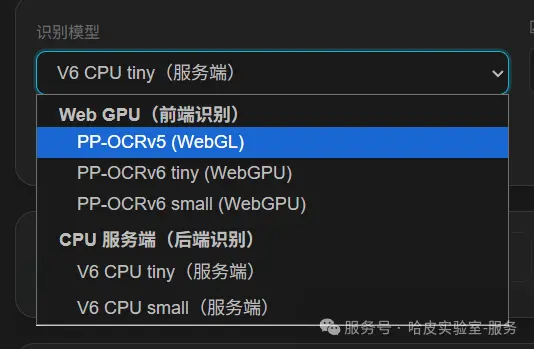
Vision / multimodal large models are capable, but rarely practical on site: they need heavy compute, depend on the network (a data-compliance risk when images leave the plant), add latency that misses production takt time, and are complex and expensive to deploy.
Hardware OCR is too rigid; large-model OCR is too heavy. Neither lands cleanly on a real production line.
Scanner-OCR V2 takes the third path: a light, on-device model on the PC you already have.
V1 was a bespoke build — one customer, one codebase. V2 is a general platform: one product for every scenario.
The current release captures on trigger pull: squeeze the trigger and the scanner returns the image immediately. This replaces the earlier polling approach and is noticeably more responsive — the capture happens when you decide, not on a timer.
The recognition engine runs locally. Images and business data never leave the plant, there is no network dependency, and it satisfies manufacturing data-security and compliance expectations by default.
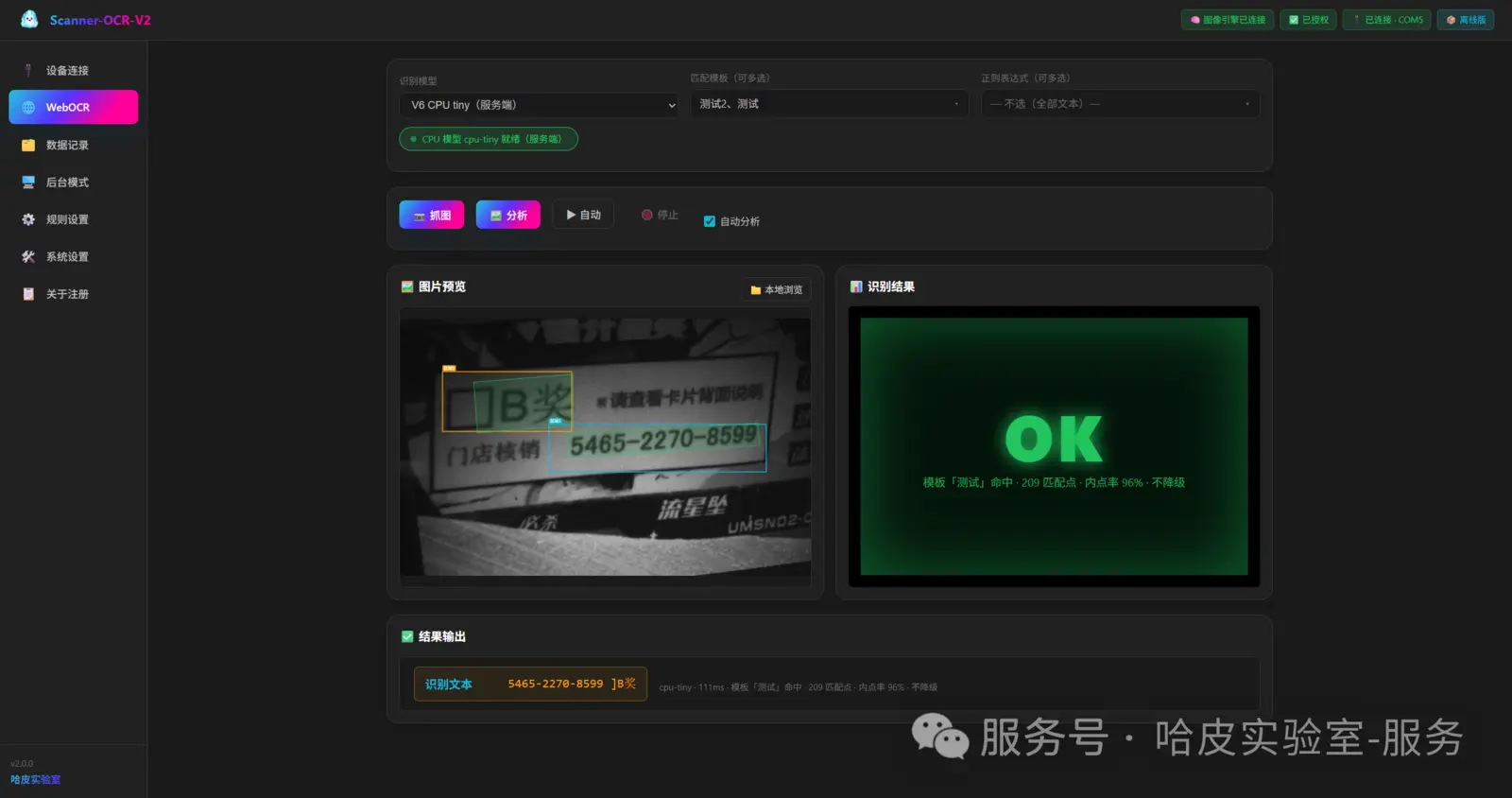
Two zero-training modes for the people on the line — they only ever look at the result:
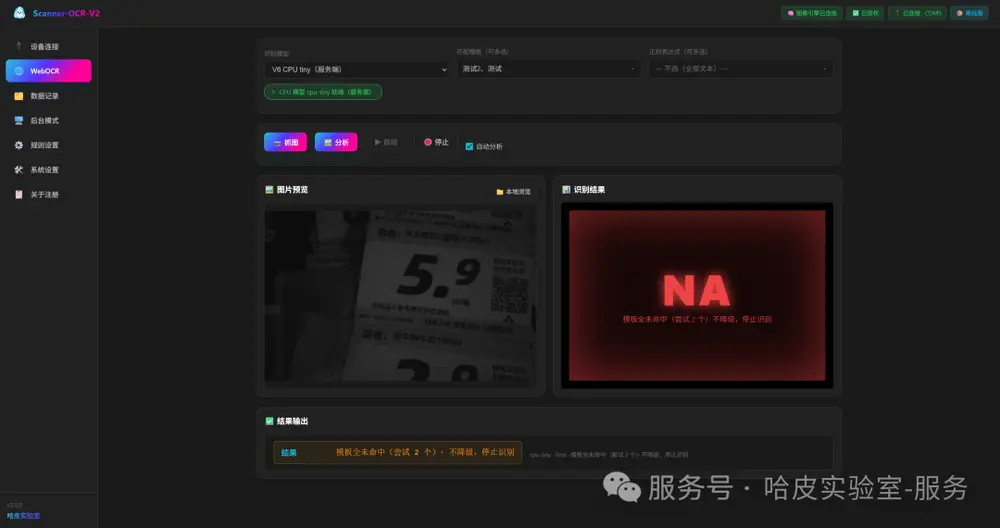
| Mode | Behaviour |
|---|---|
| 🎯 Single shot | One capture, one result: a marked-up image plus a large status light |
| 🔁 Auto loop | Continuous capture; the light breathes between states and results update live |
This is the part that changes the workflow. Results no longer sit on a screen — they are typed into whatever window has focus: Excel, ERP, your in-house system.
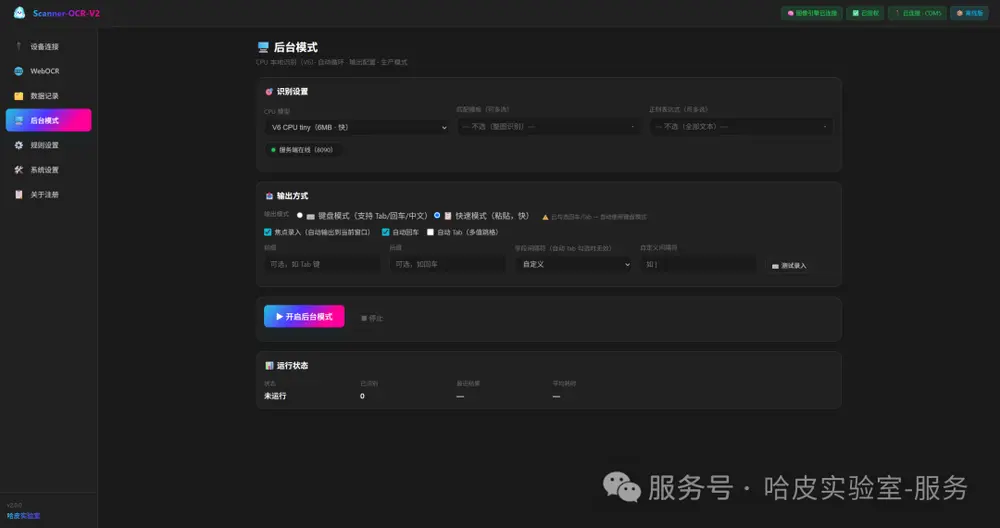
1 | Pull trigger → capture → recognise → data lands in the sheet |
Most OCR projects become “one system per customer” because the rules are hard-coded. Change the product layout and you need a developer, a rebuild and a redeploy. V2 makes the rules visual configuration: an operator can set up a new scenario in about two minutes.
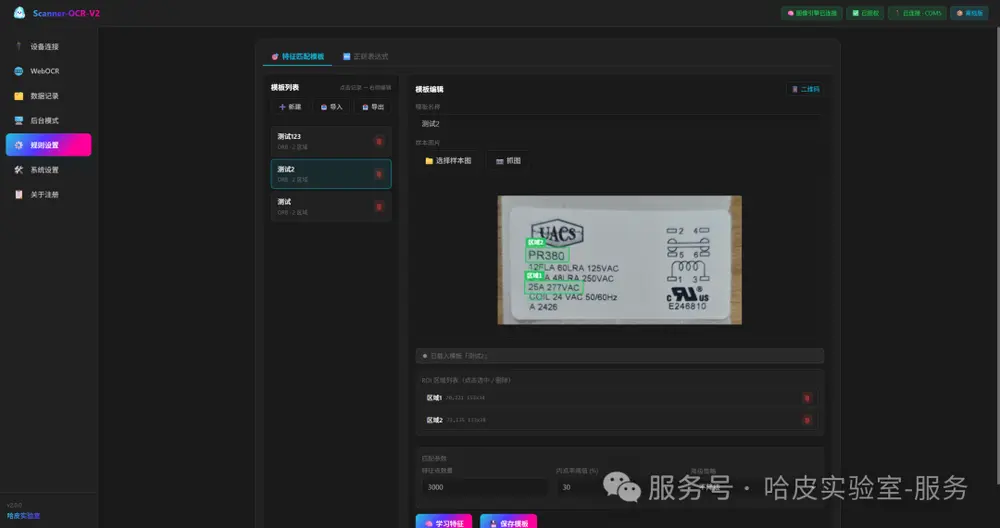
1. Feature template — tell the software where to look
1 | Pick a sample image → drag a box over the target (ROI) → learn features → save as template |
2. Regex rules — extract only the fields you want
| Capability | Description |
|---|---|
| 📝 Any field | Serial number, batch, date, amount, prize — configure what to extract |
| 🏷️ Named rules | Name each rule (serial, prize, lot_no) so results are labelled |
| 🔢 Priority order | Rules match in order, first hit wins |
| ⚙️ Enable / disable | Toggle each rule on or off |
| 📦 Import / export | Export rules as JSON; import them on another machine |
| 🧰 Presets | Built-in lottery / serial / barcode rules, ready to use |
1 | Rule: serial |
Where to look (template) + what to take (regex) = a precise result. Templates and rules are configured independently, so changing one never breaks the other.
Onboarding a new customer is no longer a development project — it’s a configuration step.
Scanner-OCR does not require a new device. It runs on a standard Windows PC and works with the scanner you already own.
Mounted on a stand, an existing handheld scanner becomes a fixed-mount OCR station. Because the scanner stays in place, you get repeatable framing without an operator holding it — and you avoid buying dedicated vision hardware. Existing devices, already paid for, turn into OCR scanners in minutes.
Scanner-OCR V2 currently supports Brady IPS scanners on the Gen7 platform:
| Wired | Wireless |
|---|---|
| 1900 · 1950 · 1960 · 1970 · 1470 · 1990 · 2100 | 1902 · 1952 · 1962 · 1972 · 1472 · 1991 · 2105 |
| HF680 · 3320g · 7120 · 7680 |
In general, models ending in 0 are wired and models ending in 2 or 5 are wireless (1991 and 2105 are wireless).
OCR streaming is bandwidth-hungry. Wireless scanners are limited by the Bluetooth link, which caps how quickly images can be transferred, so recognition is slower on a cordless device. For the fastest capture-to-result cycle — and for fixed-mount stations — a wired scanner is the better choice.
Using a scanner that isn’t on the list? We support additional models through custom development — contact us with the model.
1 | Brady IPS scanner |
| Engine | Speed | Best for |
|---|---|---|
| v5 WebGPU | ~160 ms | Older GPUs |
| v6 tiny WebGPU | ~100 ms | Modern browsers |
| ⭐ v6 tiny CPU (local) | ~60 ms | No-GPU industrial PCs / production mode |
| End-to-end (CPU v6 + ROI) | ~350 ms |
|---|---|
| Serial-number accuracy (v6 tiny) | 99.8% |
| Model size (v6 tiny) | 6 MB |
| Platform | Windows 10/11 64-bit — no GPU required |
| Offline | ✅ Fully local; data never leaves the machine |
| Hardware OCR | Large-model OCR | Scanner-OCR V2 | |
|---|---|---|---|
| Compute | Limited by the scanner | Heavy GPU / cloud | The PC you already have |
| Extensibility | ❌ Fixed at manufacture | ✅ Iterable | ✅ Grows with the PC |
| Offline | ✅ | ❌ Usually networked | ✅ Fully offline |
| Speed | Medium | Slow | ⚡ ~350 ms |
| Deployment | Medium | High | Low — one .exe |
| Data security | ✅ | ⚠️ May leave the plant | ✅ Never leaves the plant |
| 🔫 Standard license | 🛠️ Custom development | |
|---|---|---|
| Price | $180 per scanner | from $300 |
| Custom data output | — | ✅ |
| Extra language version | $100 each | — |
Optional add-on
| Add-on | Price | Note |
|---|---|---|
| Barcode quality grading | +$199 | Reference-grade aid — see the note below |
All licenses are one-time — no subscriptions, nothing to renew. Full details on the Scanner-OCR pricing page.
Try Scanner-OCR with your own scanner and your own parts for 30 days, free. Trials are arranged by contacting us today; an online order system for trials and licenses is coming soon.
The optional barcode grading module scores 1D and 2D codes against the ISO/IEC 15416 / 15415 method, producing an A–F result.
Compliance note
This module is a reference-grade aid, not a certified verifier. It does not claim ISO certification and must not be used as a formal compliance audit report. Certified grading requires standardised hardware — a controlled light source, a standard aperture and a calibrated reflectance target — which is why commercial verifiers cost far more. Use this module for trending, fast pass/fail screening and problem diagnosis; leave certification to dedicated equipment.
This global site is brand new, and our online tools are currently in Chinese. Tell us what you need and we’ll set up a fast, tailored solution for you — an English version is coming in the next few weeks.
📧 sales@happylab.me · 🌐 global.happylab.me
HappyLab builds practical AI and browser-based tools for industrial device workflows.
Previous
A barcode that scans is not a barcode that passes. Skewed, faded or smudged code...
HappyLab shared on Aug 28, 2026Next
扫码枪的条码解析规则,能不能像手机 App 一样”随时更新”? 答案是:能。客户不再需要厂家改固件、跑现场、反复调试——扫一个条码,新规则立刻生效。 场景对话:...
HappyLab shared on Aug 11, 2026