How One OCR Framework Powers Three Product Lines
Three products, three launches: Scanner OCR — a barcode scanner that reads print...
 HappyLab shared on Sep 13, 2026HappyLabshared on Sep 25, 2026
Most OCR engines are built for text that sits on a horizontal line. Which is fine — until the text is printed around a circle.
Print wheels, dials, knobs and caps all carry characters arranged along an arc. Put one of those in front of a conventional OCR engine and it doesn’t misread the text; it reads nothing at all. The characters each face a different direction, so they never form a text line the detector can find.
We fixed that. Our browser OCR tool now reads circular text — using a geometric method we built ourselves, on top of our own on-device OCR model.
TIP
New global site. The tool interface is currently in Chinese while we finish the English build — it ships in October 2026. The tool works the same regardless of language; tell us what you need and we’ll help you test it: sales@happylab.me.
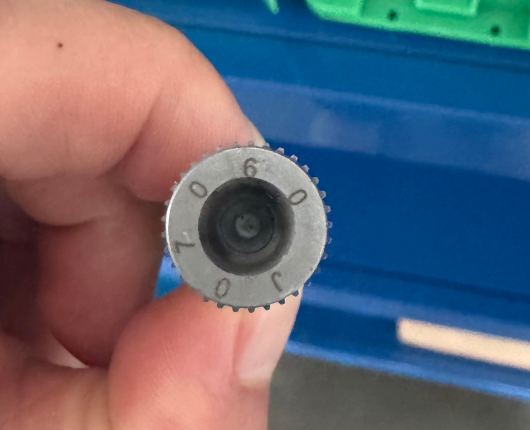
This is a real print wheel: a small metal disc with 0 9 0 6 0 J stamped one character at a time around its rim.
A conventional OCR engine returns zero results on this image. Not a wrong answer — no answer. The bottleneck isn’t recognition, it’s detection: mainstream OCR only accepts horizontal text lines, and characters arranged in a ring face every direction but the same one.
Adjusting brightness or contrast doesn’t help. We tested contrast enhancement, sharpening, inversion and binarization on the raw image — every variant produced zero detections. If the orientation is wrong, no amount of enhancement fixes it.
The root cause is orientation, so instead of touching the model we straighten the image first.
We use a geometric unwrap to turn the ring into a straight line. Think of cutting a strip of tape off the rim and laying it flat: the circle of characters becomes an ordinary horizontal line of text. That line then goes to our own OCR engine — the same on-device model used across our products.
In practice it takes two steps:
The important part: this is a pure geometric transformation. It needs no ring-shaped training data, no retraining and no second model. That keeps it light, fast and portable — the same logic runs in the browser, on Android PDAs and on fixed-mount devices.
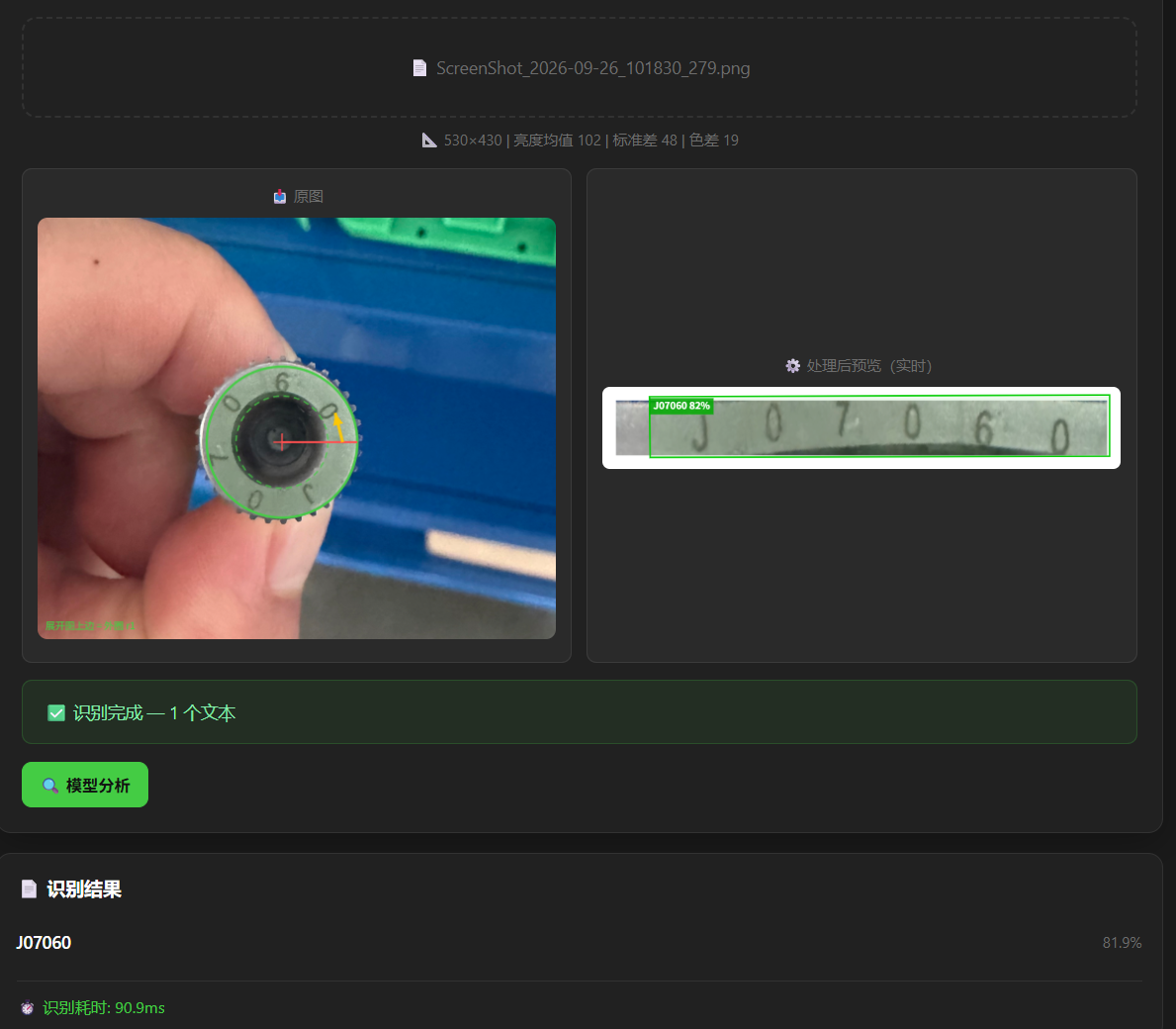
Same print wheel, same engine, with the unwrap enabled:
| Recognised text | J07060 |
| Confidence | 98% |
| Time | ~90 ms |
On the left, the algorithm has located the ring on its own (green band plus a cross at the centre). On the right is the unwrapped strip — the characters that ran around the circle now sit on one straight line, and the bounding box lands right on them.
Any part where the characters run around a circle:
If the characters are arranged in a circle, it is worth a test.
Where others might train a dedicated model for circular text, we turned the problem back into a standard one with a geometric transform.
TIP
If the text is misread, switch the orientation (top outward / top inward) and reading direction (clockwise / counter-clockwise) controls in the same panel. Characters are stamped in different orientations on different parts, and these two settings usually settle it.
This global site is brand new, and our online tools are currently in Chinese. Tell us what you need and we’ll set up a fast, tailored solution for you — an English version is coming in the next few weeks.
📧 sales@happylab.me · 🌐 global.happylab.me
HappyLab builds practical AI and browser-based tools for industrial device workflows.
Next
Three products, three launches: Scanner OCR — a barcode scanner that reads print...
HappyLab shared on Sep 13, 2026