Two jobs on an Android handheld get in the way of everything else: getting printed data into your business app, and getting a device debugged on a customer site.
HappyLab solves both, on the device and in the browser.
- Android OCR turns a PDA into an OCR terminal — press the scan key, and the printed text lands in the active field.
- AI-ADB runs a full ADB console in a browser tab — no drivers, no Python, no software on the customer’s machine.
Neither needs a backend, and neither sends your data anywhere.
Android OCR: read printed text on the device
A barcode scanner beeps all day and reads nothing but barcodes. Ask it for the printed serial number on a label, a batch code, an expiry date or a document reference, and it has nothing to say — those are printed characters, not encoded data. Until now, that meant typing the value by hand or running a separate OCR workflow.
Android OCR runs on the PDA as a background service. It reads printed text through the camera or the built-in scan engine and types the result straight into whatever field has focus. Press the scan key and the value appears — the same gesture your team already uses for barcodes.
Everything is computed on the device. No network, no server, no image ever leaving the PDA.
1 | Business app (cursor in a field) |
Two capture paths
| Mode | Source | Best for |
|---|---|---|
| 📷 Camera | Preview and capture through the device camera | Free framing and wide fields of view |
| 🔦 Scan engine | The PDA’s built-in scan engine | Devices with no camera, a camera in use, or where scan-head LED illumination helps |
Three ways to trigger it
| Trigger | How it works | Typical use |
|---|---|---|
| ⌨️ Physical scan key | The service listens for the PDA’s side or gun key | The most natural gesture for operators |
| 📡 Broadcast | A business app sends an ocr.scan broadcast |
System-driven capture; no SDK to bundle |
| 🪟 Floating ball | A draggable on-screen button; tap to capture | Devices without a scan key, and tablets |
The broadcast channel is what makes integration cheap. One line in your app is enough:
1 | Intent intent = new Intent("ocr.scan"); |
Getting the result into your system
| Output channel | Description |
|---|---|
| ⌨️ Accessibility focus injection | Types the text into the focused field; handles CJK input reliably |
| 📡 Broadcast output | Sends the result to your app through a configurable action and key |
| 🧹 Whitespace trimming | Optional: strip half-width and full-width spaces |
| ⏎ Append Enter | Optional: send Enter after a successful read |
Recognition engine
| Tier | Model size | Best for |
|---|---|---|
| 🪶 Tiny (default) | 6 MB | Production lines; smooth on mid-range PDAs |
| 📱 Small | 30.5 MB | Higher accuracy on complex backgrounds |
Detect plus recognise, with in-house pre- and post-processing. A single region takes roughly 37 ms, only the framed area is processed, and you can switch tiers at runtime without reinstalling.
A 15-filter pre-processing chain and a regex rule library then turn the recognised text into the exact field you wanted:
1 | Rule: Serial number |
Supported devices
Tested Android PDA families include EDA5S · EDA10A · EDA51 · EDA52 · EDA56 · EDA61K · CT32 · CT40 · CT45 · CT47 · CK62 · CK65 · CK67 · RT10A.
Using a model that is not listed? We support additional devices through custom development — send us the model.
Built for the next hardware generation
Android OCR runs a standard ONNX model on a standard Android inference stack — a deliberate choice:
- ✅ Runs on today’s hardware — no special silicon required; mainstream PDAs are enough.
- 🔮 Gets faster on tomorrow’s — the next generation of PDAs ships dedicated NPUs, and because the engine uses standard execution providers, those devices accelerate it with no code changes.
- 📈 The model can grow — upgrade or swap the model without touching the hardware you already own.
Recognition capability should not be frozen at the moment of purchase.
AI-ADB: a full ADB console in the browser
Debugging an Android device should not require a toolchain. Installing ADB, matching drivers, fixing environment variables, hunting for a data cable, keeping a second phone ready to film the screen — the setup often takes longer than the fix. On a customer site, with a locked-down laptop and no admin rights, it can take all afternoon.
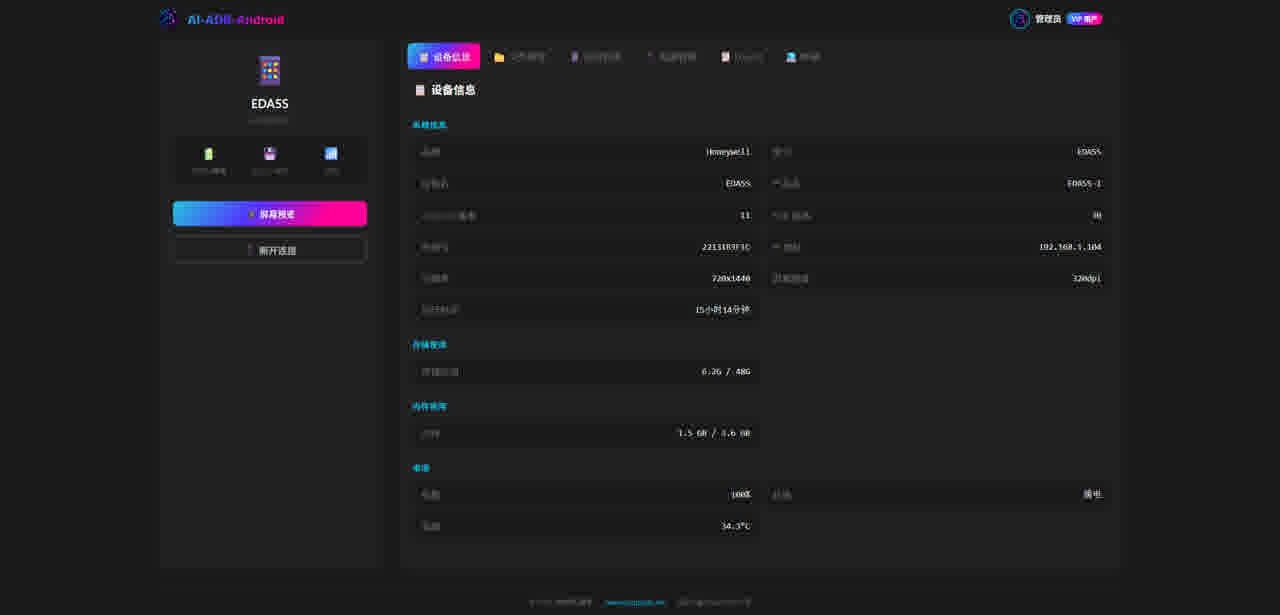
AI-ADB is a complete Android device console that runs entirely in a web browser. Plug in a USB cable, open a tab, and start working. No ADB install, no Python, no drivers, no software to deploy on the customer’s machine.
All communication happens over the USB cable itself. Nothing is sent to a server, so there is zero latency and zero data exposure.
| Capability | What you get |
|---|---|
| Device dashboard | Model, Android version, SDK, resolution, serial number, battery, storage, memory |
| File management | Browse, drag and drop files in, pull files out, preview, rename, delete |
| App management | List, search, install, uninstall, start, stop; export APKs; bulk permissions |
| Logcat | A live, colour-coded log stream with package filtering and one-click export |
| Terminal | A real ADB shell in the browser, with command history |
| Screen mirroring | Low-latency mirror to your screen, driven by mouse and keyboard |
| Power and system | Reboot, recovery, bootloader, screenshots, rotation, volume, 16 one-tap presets |
Mirroring uses the scrcpy protocol — H.264 hardware encoding on the device, decoded in the browser through WebCodecs and rendered to a canvas. The result is low-latency mirroring with click, swipe and drag mapped precisely to the device, plus a full navigation bar, screen wake and sleep, rotation, live screenshots and screen recording to a downloadable video. No plugins, no separate mirroring app.
Where it fits
| Scenario | How it helps |
|---|---|
| 🎤 Pre-sales demos | Mirror the device to a projector and hand the customer the mouse. No install, no dongles |
| 🛠️ On-site debugging | The customer’s PC has no ADB, no Python, no drivers — open a browser instead |
| 🌐 Remote support | The operator plugs in a cable and opens a URL; support reads the log live |
| 🏭 Production-line testing | One browser window to capture screenshots, export logs and batch-install apps |
| 🎥 Training and documentation | Mirror the walkthrough, record it in the same tab, download the video |
Pricing
| Product | Free | Online | Offline |
|---|---|---|---|
| AI-ADB | ✅ | $69 one-time | $99 one-time |
| Android OCR | 30-day trial | — | $199 one-time |
All licenses are one-time — no subscriptions, nothing to renew. Custom development starts at $300 for a specific output format, a non-listed device or an extra language.
Requirements and limits
- Android OCR: Android 9+ (minSdk 29). Scan-engine mode needs a compatible scan engine; camera mode needs a camera. The license is bound to the device serial number. Key injection is system-restricted on Android, so accessibility-based injection is used today — native keyboard injection is in progress.
- AI-ADB: a Chromium-based browser only (Chrome or Edge); Firefox and Safari do not expose WebUSB. USB debugging must be enabled, and some vendor ROMs restrict ADB by default. USB only — this is not a wireless ADB tool.
- Interface language: Chinese for both today; the English build is in progress.
- Fully offline: no backend, no database, no data leaving the device.
Try it first
Open AI-ADB in your browser with a device on the end of a USB cable and see it for yourself. For OCR on the desktop, try the online OCR tool.
Related reading: Android-OCR: On-Device OCR for Android PDAs and AI-ADB: Control Any Android Device From Your Browser.
💬 Questions or a custom requirement?
Tell us your device model and what you need it to do, and we will tell you whether it works out of the box or needs a custom build.