
A barcode scanner beeps all day and reads exactly one kind of thing: a barcode.
Ask it for the etched serial on a machined part, the lot number on a label, the expiry date, or a document reference, and it has nothing to say. Those are printed characters, not encoded data — there is no symbology to decode. On the line, that means typing the value by hand or running a second, separate OCR workflow.
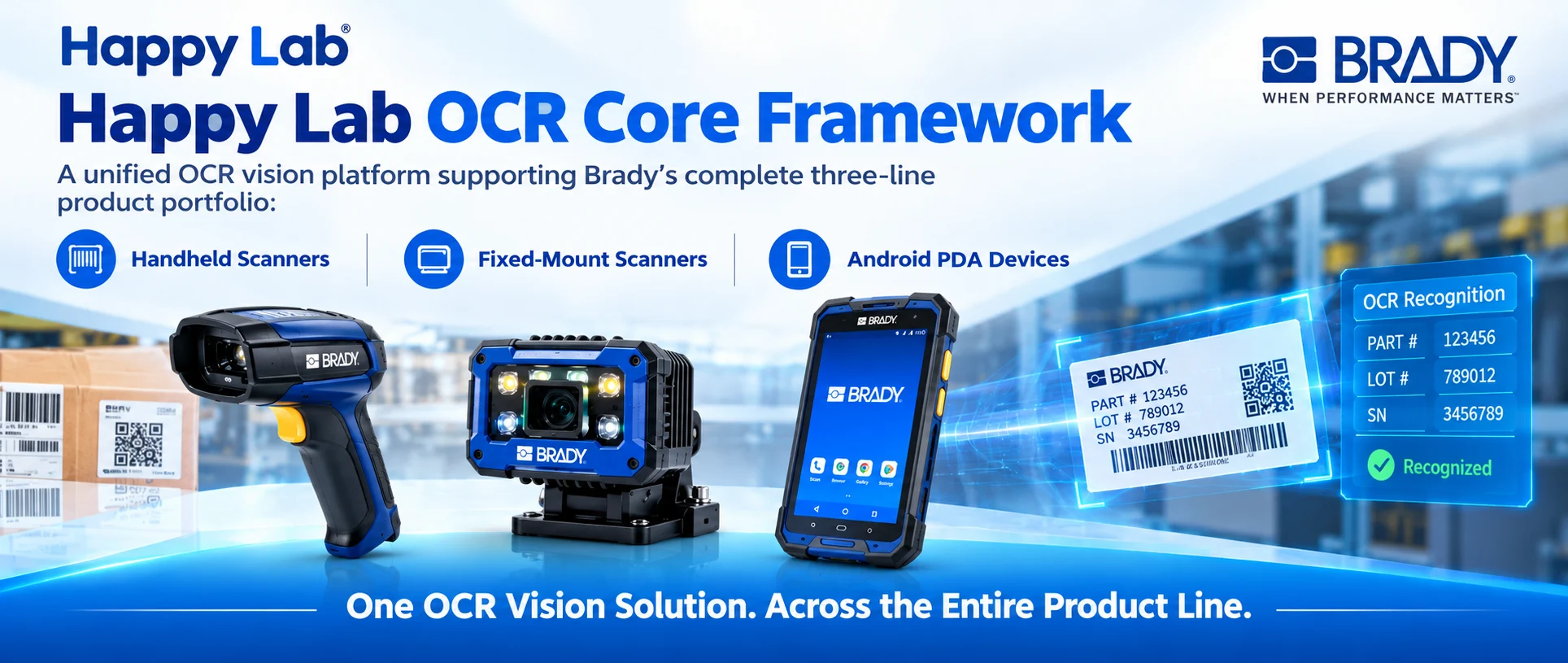
HappyLab adds OCR to the devices you already have. Three form factors — handheld scanner, fixed-mount reader and Android PDA — all read printed text, extract the fields you want with rules, and put the result straight into the system that needs it.
All three run fully offline, on the hardware you already own. No cloud, no image ever leaving your plant.
The problem with the usual answers
Two approaches dominate, and both hit a wall on a real line.
OCR built into the device hardware is easy to deploy but frozen at the moment of manufacture. The model is fixed: it cannot follow a new character set, a new layout or an extra inspection point, and it cannot be tuned for a new industry.
Vision or multimodal large models are capable, but rarely practical on site. They need heavy compute, depend on the network — a data-compliance risk when images leave the building — add latency that misses takt time, and are complex and expensive to deploy.
Device-side OCR is too rigid. Large-model OCR is too heavy. Neither lands cleanly on a production line.
HappyLab takes the third path: a light, on-device model running on the PC or PDA you already have.
Three form factors, one engine
| Product | Runs on | Capture comes from | Best for |
|---|---|---|---|
| 🔫 Scanner OCR | A desktop app (single file, no install chain) | A handheld scanner over USB | Reading characters at the same station that scans |
| 📦 Fixed-Mount OCR | A Windows or Linux industrial PC | A fixed-mount reader, image pushed over FTP | Unattended, automatic, line-side operation |
| 📱 Android OCR | An Android PDA or tablet | The PDA camera, or the built-in scan engine | Mobile capture anywhere in the plant |
All three share the same four upper layers — pre-processing, engine, rules and output. Only the bottom capture layer changes with the hardware, so an upgrade to the model or the rules reaches every form factor at once.
How it works
1 | Capture (USB · FTP · camera / scan engine) |
Step 1 — capture the frame. On a scanner, squeezing the trigger returns the image immediately. On a fixed-mount reader, a photoelectric sensor triggers the IO and the image is pushed over FTP with no operator involved. On Android, a scan key, a broadcast or an on-screen button does it.
Step 2 — clean the image. A 15-filter chain handles dark, low-contrast, colour-cast and shadowed captures before recognition, so the engine is not fighting the lighting.
Step 3 — recognise. Detect plus recognise, with in-house pre- and post-processing. The default tiny model is 6 MB and processes a single region in roughly 37 ms; the small model (30.5 MB) is there for complex backgrounds. Switch between them at runtime — no reinstall.
Step 4 — extract only what you want. Configure named rules so the result is a clean field, not a wall of text:
1 | Rule: serial |
Step 5 — put it where it belongs. Focus injection types the value into whatever field has focus — Excel, ERP, WMS, your in-house app — exactly like a barcode scan.
Capabilities
| Capability | What it gives you |
|---|---|
| Fully offline | The engine runs locally. Images and business data never leave the plant, so data-security and compliance expectations are met by default. |
| Region-only recognition | Box the target once, and the software finds it on every part — roughly 8–10× faster, and the result stays clean. |
| Three-level fallback | Template match → feature match → whole-image, so a shifted or tilted target still reads and the line keeps running. |
| Regex field extraction | Any field, named rules, priority order, on/off toggles, JSON import/export between machines. |
| Focus injection | Types results into the active field, with CJK support, Tab navigation and auto-Enter. |
| Operator view | A marked-up image plus a large status light — green for OK, fast red flash for no-read — visible from five metres. |
| Traceable records | Every read is logged and exportable, so a batch can be reconstructed later. |
| Measured accuracy | 99.8% serial-number accuracy on the tiny model in production testing. |
Where it fits
| Scenario | The pain | How OCR helps |
|---|---|---|
| 🏭 Traceability on machined parts | Serials are etched or stamped, not encoded | Read the characters and log them with no extra station |
| 🏷️ Label and batch data | Lot, date and batch codes are printed text | One trigger reads the value into the system |
| 📦 Incoming inspection | Supplier marking formats vary | Read and archive the value, one consistent rule |
| 📱 Field data entry | Operators type serials by hand — slowly and with errors | Press the scan key and the value appears |
Requirements and limits
- Platform: Windows 10/11 64-bit for the scanner and fixed-mount products; Android 9+ for the PDA product. No GPU required.
- Capture: a supported handheld scanner or fixed-mount reader over USB, or an Android PDA camera or scan engine. Other models are supported through custom development.
- Interface language: Chinese today; the English build is in progress.
- Fully offline: no backend, no cloud, nothing leaving the machine or the device.
- Accuracy depends on image quality — flat, evenly lit and in focus gives the best result.
Start with the free online tool
You can try the same engine in your browser before talking to anyone: run OCR on an image and see the result. No install and no sign-up.
Then, when you are ready:
| Product | From |
|---|---|
| Scanner OCR V2 | $180 per scanner |
| Fixed-Mount OCR V2 | $680 |
| Android OCR | $199 |
Every license is one-time — no subscriptions. A free 30-day trial is available on request.
Read the details
- Scanner-OCR V2: Add OCR to Your Barcode Scanner
- Fixed-Mount OCR V2: Read Characters and Grade Barcode Quality on the Line
- Android-OCR: On-Device OCR for Android PDAs
- Web OCR: Test On-Device OCR in Your Browser, Free
💬 Questions or a custom requirement?
Tell us what you need to read and where it is printed, and we will set up a fast, tailored version for you — including a free trial on your own parts.